Most Okta tenants already “have MFA.” That sentence still shows up in questionnaires, board decks, and vendor renewals. It is not the finish line.
SMS, email OTP, and push approvals get phished—often live, through an adversary-in-the-middle kit that proxies the real login page and walks away with a session. Okta phishing-resistant MFA is the bar that changes that: the authenticator cryptographically binds to the legitimate origin, so a lookalike site cannot replay a valid response. Everything else in this post is about the gap between offering that bar and actually requiring it.
What “good enough” MFA still loses to
SMS, email OTP, and voice
Still common. Contractors. Executives who never finished enrollment. Legacy authenticator enrollment rules nobody revisited. Attackers do not need clever malware—SIM swap, mailbox takeover, or a helpful help desk is enough. If the second factor can leave the channel, it is not phishing-resistant. Transitional at best. End state for workforce access? No.
Push MFA and fatigue
Push is better than SMS until users are trained to tap Approve. Prompt bombing exploits that habit. Number matching helps; turn it on. Matching a number on a phishing page still does not prove the browser is on your Okta domain. Bridge factor. Not the bar.
Adversary-in-the-middle kits
The kit sits between the user and the real page. Username, password, OTP—or Approve—and the proxy captures the session. TOTP and classic push prove a secret or a device tap. They do not prove origin. “We use authenticator apps” aged well until AiTM became commodity.
Why the bar keeps rising
CISA-style guidance keeps pointing at phishing-resistant authenticators for high-value access. Insurance questionnaires ask which MFA, not only whether MFA is on. No scare story required: if your factor mix can still be proxied, your residual risk—and your underwriter answers—look different from a peer who requires phishing-resistant methods for admins and crown-jewel apps.
What phishing-resistant actually means
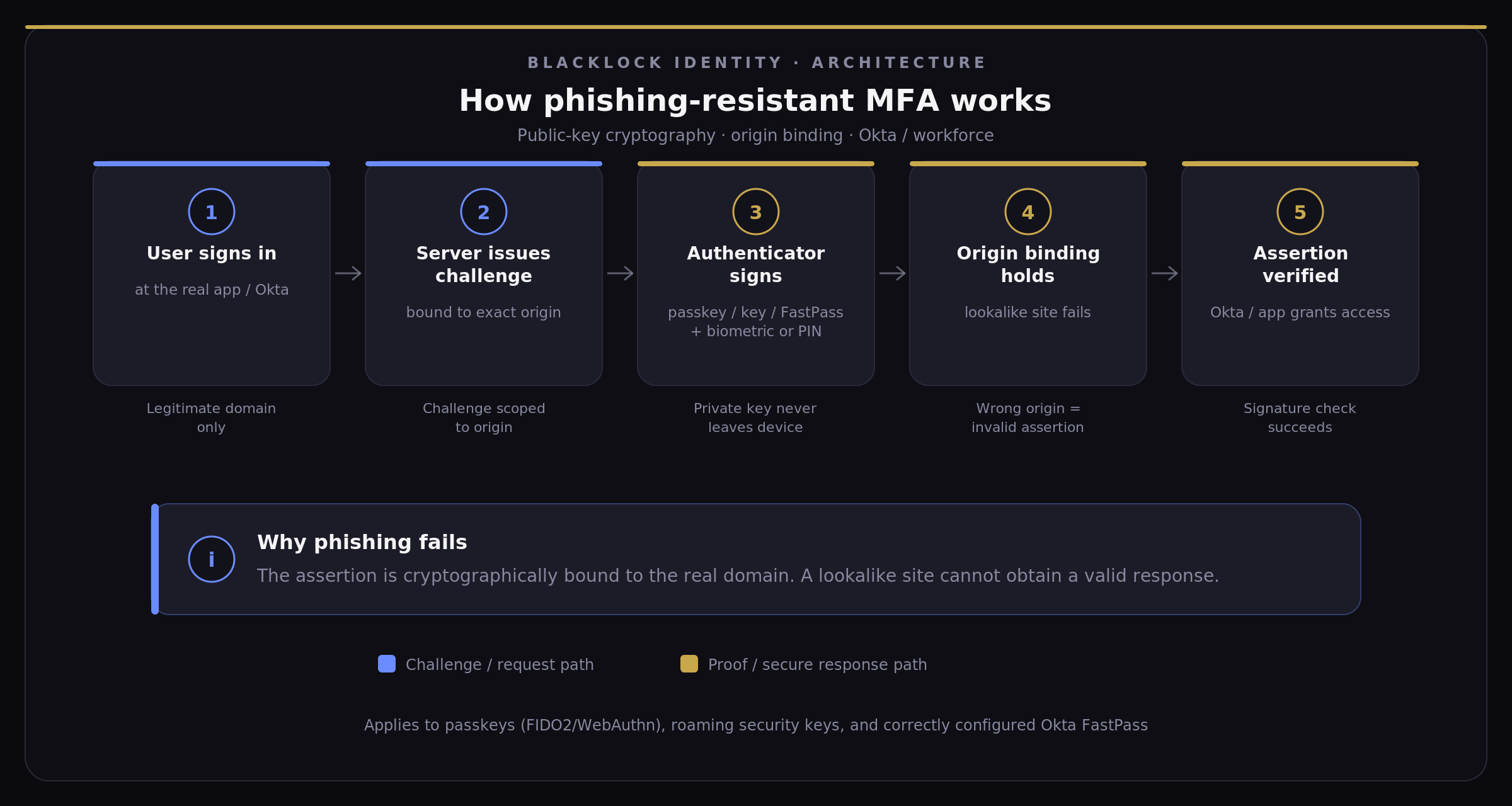
Public-key cryptography. Private key stays on the authenticator—platform store, security key, or managed device. Challenge/response scoped to the legitimate domain. Fake site gets nothing useful.
In workforce Okta, that usually means FIDO2 / WebAuthn (passkeys and hardware keys) and FastPass when policy treats it correctly. Smart cards exist for some regulated shops. Most workforce Okta programs land on passkeys, FastPass, and a smaller set of hardware keys for privileged access.
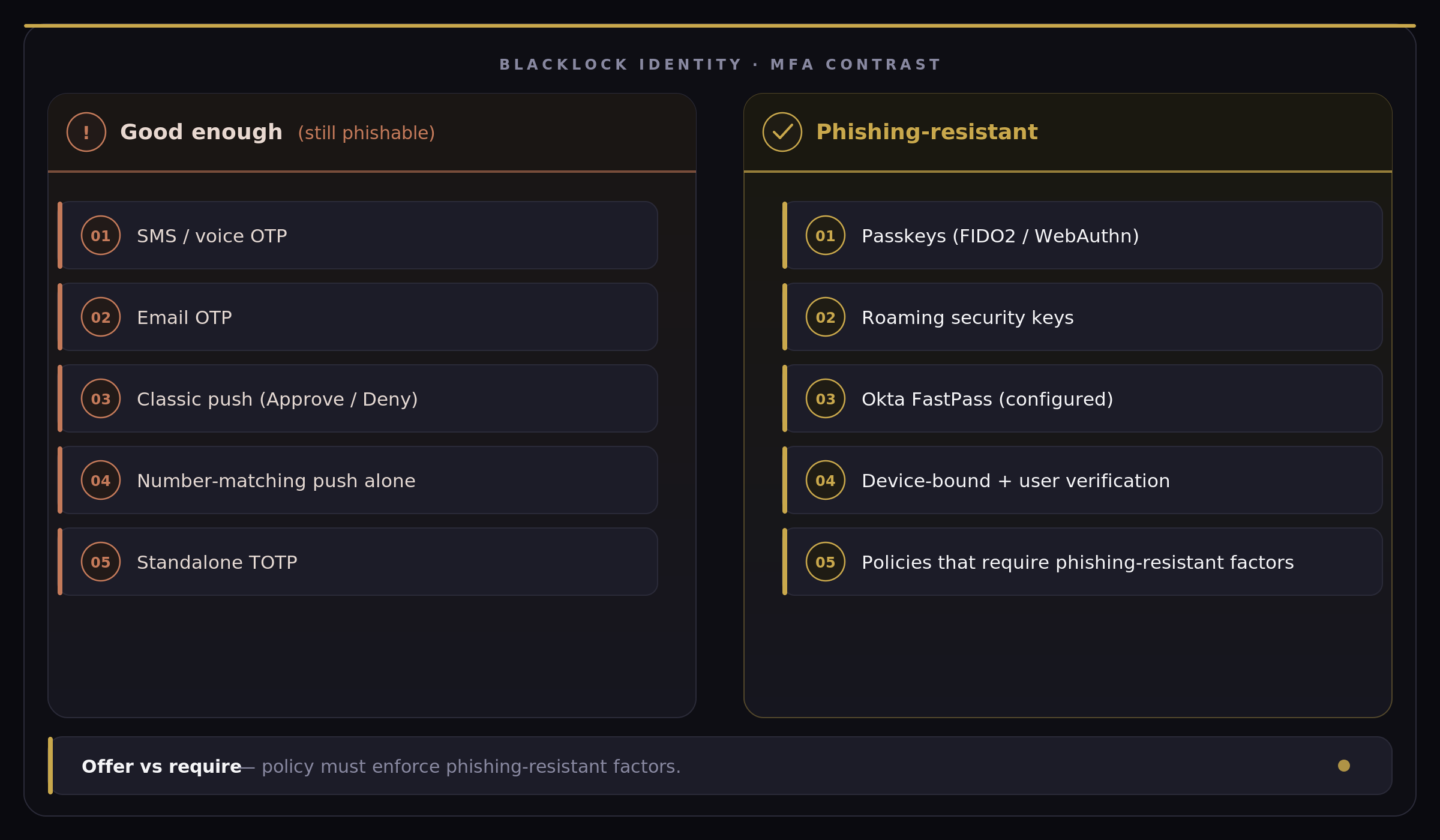
Good enough vs phishing-resistant
| Good enough (still phishable) | Phishing-resistant |
|---|---|
| SMS / voice OTP | Passkeys (FIDO2 / WebAuthn) — platform biometrics |
| Email OTP | Roaming security keys (YubiKey-class FIDO2) |
| Classic push (Approve / Deny) | Okta FastPass when configured for phishing resistance |
| Number-matching push alone | Device-bound authenticators with user verification |
| Standalone TOTP codes | App sign-in policies that require phishing-resistant factors |
One pattern shows up often enough to name: a tenant enrolled passkeys for half the workforce, celebrated the dashboard, and left SMS as an allowed fallback. Enrollment looked modern. Sign-in still completed on a text. Offering a strong factor while a weak one can finish the same flow is not requiring phishing resistance.
How phishing-resistant MFA works
At a high level, the authenticator proves possession of a private key in response to a challenge that is bound to the real website (the origin). That is why a lookalike phishing page cannot complete a valid sign-in—even if a user is tricked into starting the flow there.
How Okta phishing-resistant MFA shows up
Passkeys, FIDO2/WebAuthn, FastPass—useful names. The useful question is which policy line enforces them.
Passkeys (FIDO2 WebAuthn)
Platform authenticators (Touch ID, Windows Hello, and peers) and roaming security keys. Passwordless-feeling sign-in with biometric or PIN. Usernameless is possible when enrollment and discovery are designed for it—not when someone flips a switch and hopes.
Synced vs device-bound is a real decision. Synced passkeys ease recovery and multi-device life; they complicate the audit question of where the credential lives. Device-bound or hardware-bound keys tighten the story for admins and high-risk roles. Decide on purpose. Sync policy as an afterthought is how you inherit someone else’s recovery model.
Okta FastPass
Device-bound, biometric- or PIN-backed sign-in—often passwordless—on managed devices, and sometimes unmanaged ones depending on posture. FastPass “on” is not the same as phishing-resistant. Policy has to treat it as a phishing-resistant possession factor with user interaction, and biometric user verification where you need that assurance. Done tightly, it scales a managed laptop fleet. Done loosely, it joins the “we thought we were passwordless” pile.
Who gets what
Admins, identity operators, finance, and similar high-risk roles: hardware keys and/or tightly controlled device-bound authenticators. Prefer require over offer.
Broad workforce on managed laptops: FastPass as the daily path. Fewer tickets than shipping keys to everyone.
BYOD, hybrid, contractors: passkeys with clear rules on which sync providers you accept, plus exception handling for apps that cannot finish a WebAuthn ceremony.
Most healthy tenants mix these. The mix is fine. The silent downgrade is not.
Policy knobs that decide the outcome
Three places matter more than the feature list.
Authenticator enrollment. Require phishing-resistant authenticators for the groups that need them. If users can add SMS later “just in case,” you rebuilt the downgrade path. That is the passkey-plus-SMS tenant again—different logo, same shape.
App sign-in policies. Possession constraints set to phishing resistant. User interaction required. Biometric user verification where risk warrants it. “Allow any MFA” is how good-enough factors walk back in. Offer vs require is not a nuance; it is the whole game.
Silent downgrades. Rules that fall back to email OTP or classic push when a phishing-resistant challenge fails. Prefer a clear failure and a supported recovery path over automatic weakening. System Log will tell you which apps and groups are still completing on weak factors—if you look.
Okta depth here is not a product brochure. It is knowing which line actually holds.
A practical rollout for Okta workforce teams
Inventory first
Before the passwordless announcement, map what is true today.
Who still has SMS or email OTP as a usable factor? Which apps sit in WebViews or embedded browsers that break WebAuthn? Who can reach Admin Console, identity tools, finance systems—and with which factors?
Usually a week of System Log review and app sampling. Not a multi-month discovery theater.
Crown jewels before the broad fleet
Admin Console. Identity admins. Finance. Executives where the blast radius is ugly. Require phishing-resistant authenticators. Issue hardware keys where managed-device FastPass is not enough. This shrinks risk fast and gives leadership and insurance a clean interim story while the rest is still in flight.
One rollout looked fine in Okta Verify enrollment stats until the finance WebView app hit enforcement day. Ceremony never completed. Tickets spiked. The fix was sequenced exceptions and a browser-based path—not a retreat to push for everyone. Plan the broken apps before you flip require.
Enroll without flooding the help desk
Pilot with IT, security, and one willing business unit. FastPass on managed devices. Walk passkey enrollment for hybrid users. Document recovery before you enforce.
Messaging can stay short:
We’re upgrading how you sign in. Texts and simple push approvals can still be phished. You’ll enroll a stronger method—usually a biometric on your work laptop or a security key—so only the real login site can complete sign-in. IT will support exceptions for apps that aren’t ready yet.
Enforce, then expand
Tighten app sign-in by group and app criticality. Retire SMS and email OTP for workforce users when coverage is real—not merely “available in the list.” Watch System Log for denials, failed phishing-resistant challenges, and apps that still force weak fallbacks. Expand from crown jewels to standard SaaS after the pilot’s ticket volume and failure modes are understood.
Gotchas that keep recurring
WebView and embedded browsers: some mobile or desktop apps never finish a proper WebAuthn ceremony. Browser-based or alternate flows before enforcement day.
macOS Safari SSO extension: FastPass / passwordless paths often need the Okta Browser Plugin / SSO extension story sorted. Skip it and you collect “works in Chrome” tickets.
Synced passkeys and audits: know whether credentials sync via platform vendors and how control owners will read that.
Enrollment that allows weak factors later: requiring phishing-resistant on day one, then leaving SMS open, quietly undoes the crown-jewel work. Same for Admin Console still sitting on push while the workforce “goes passwordless.”
Fixable with policy and sequencing. Not reasons to stay on good enough.
Decision checklist
- Can AiTM defeat our current mix? If SMS, email OTP, classic push, or TOTP can complete high-value sign-in, assume yes.
- Are admins on phishing-resistant authenticators today? Admin Console and identity operators first—exceptions time-boxed or none.
- Do app sign-in policies require phishing resistance—or only offer it? Offer ≠ enforce.
- FastPass vs passkeys vs hardware keys—who gets what? Managed majority, hybrid/BYOD, privileged roles need different defaults.
- What fails before enforcement day? WebViews, Safari SSO extension, recovery, and any enrollment path that still adds SMS.
If items 2 and 3 are fuzzy, you are still on good enough—even if passkeys appear in the authenticator catalog.
Next step
If the reality check says you are still on good-enough MFA, the next move is usually a short assessment and architecture pass, then pilot-to-enforce—not a platform RFP. Blacklock Identity works with organizations running Okta on Workforce Identity and Adaptive MFA design, Proof of Concept & Rollout, and ongoing management. For a second set of eyes on enrollment rules, app sign-in policy, and a plan that survives help-desk load, start a conversation.
MFA users can be tricked into giving away is not MFA that cannot answer a fake site. Passkeys and phishing-resistant authenticators are the bar; Okta already has the building blocks. The work is policy discipline and staged enforcement. Having MFA was last year’s finish line. Require phishing-resistant—or you are still on good enough.
[About Blacklock Identity](https://blacklockid.com/#about) — Frisco, TX. Okta-focused identity work for teams that need the policy line to match the slide deck.
FAQ
Is number-matching push phishing-resistant?
No. It cuts prompt bombing. It does not bind the response to your real Okta origin. AiTM kits still win.
If we enrolled passkeys, are we done?
Only if app sign-in policies require phishing-resistant factors and weak fallbacks (SMS, email OTP, classic push) cannot complete the same flows. Offer ≠ require.
FastPass or passkeys?
Managed laptop majority → FastPass as the daily path. Hybrid/BYOD → passkeys with sync rules you can defend. Privileged roles → hardware keys (or tightly device-bound) with require, not offer.
What’s the fastest risk cut?
Admin Console, identity operators, finance, and other crown jewels on phishing-resistant authenticators first. Broad workforce after the failure modes are known.
Where do rollouts usually break?
WebView apps that never finish WebAuthn, Safari SSO extension gaps, and enrollment policies that still let users add SMS “just in case.”